
Support everyday lesson preparation
Help teachers turn your curriculum into lesson plans and classroom resources they can review, adapt and use.
KITABOOTE+
Help teachers bring your curriculum to life, with AI support grounded in your content and guided by their expertise. KITABOO TE+ is a teaching platform K-12 publishers offer under their own brand.
Teachers review, edit and choose what works for their classroom.
Teachers click your program in their LMS and they are in. No new password. Nothing to set up. So more teachers actually use it.
Create with TE+
From Northstar Learning · Chapter 1
Teachers choose the lesson and class duration. TE+ drafts a plan with source references, ready for teachers to review and adapt.
Northstar Math, Grade 4 · Lesson 1.2 · 40 min
Find right angles around the classroom · p. 11
Perpendicular lines and the 90° mark · p. 12–14
Which pair of lines is perpendicular? · p. 14
Exercise 1A, questions 1–6 · p. 16
Mark the right angle in Fig 1.5 · p. 15
Draft slides, worksheets, organizers and flashcards from the selected lesson, using your book’s images. Teachers review and edit before use.
Slide 2 of 12 · Page numbers are hidden when the teacher presents.
Help teachers draft questions and review the answers against your book. Source references support review, and teachers decide what to use.
Northstar Math, Grade 4 · Chapters 1–2 · 20 questions
+ 17 more questions
Try it here. Tap a card for each raised hand, then show the results. Students don’t need devices. No student names are saved.
Hands-up poll · Class 4B
A teacher’s edition is the version of a textbook made for teachers, with answers, guidance and teaching notes. KITABOO TE+ (Teacher’s Edition Plus) turns your teacher’s edition into an AI teaching platform under your brand: teachers create lesson plans, slides, worksheets and quizzes from your pages, and every item shows its page number.



















Gallup and Walton Family Foundation, June 2025.
Help teachers turn your curriculum into lesson plans and classroom resources they can review, adapt and use.
Bring your teaching guidance into daily preparation, with your content and your brand at the centre.
Visible sources and editable drafts help teachers make informed choices for their classroom.
Help teachers prepare plans, activities and assessments connected to your lessons and teaching guidance. Your curriculum and their preparation tools sit side by side, under your brand.
In their own words
TE+ is new, so here is what publishers say about the KITABOO platform it is built on.
G24.4/5
“KITABOO has been an invaluable partner to The Institute of Ismaili Studies, offering a seamless, innovative digital textbook solution that enhances teaching and learning.”
Your textbook content is not used to train AI models. Licensed teacher access and separation from other publishers’ content help you retain control.
AI models don’t train on your textbook content.
Only teachers with a license can use your books in TE+.
Your content stays separate from other publishers’ content.
A three-minute tour, from one click in the LMS to a show-of-hands poll in class.
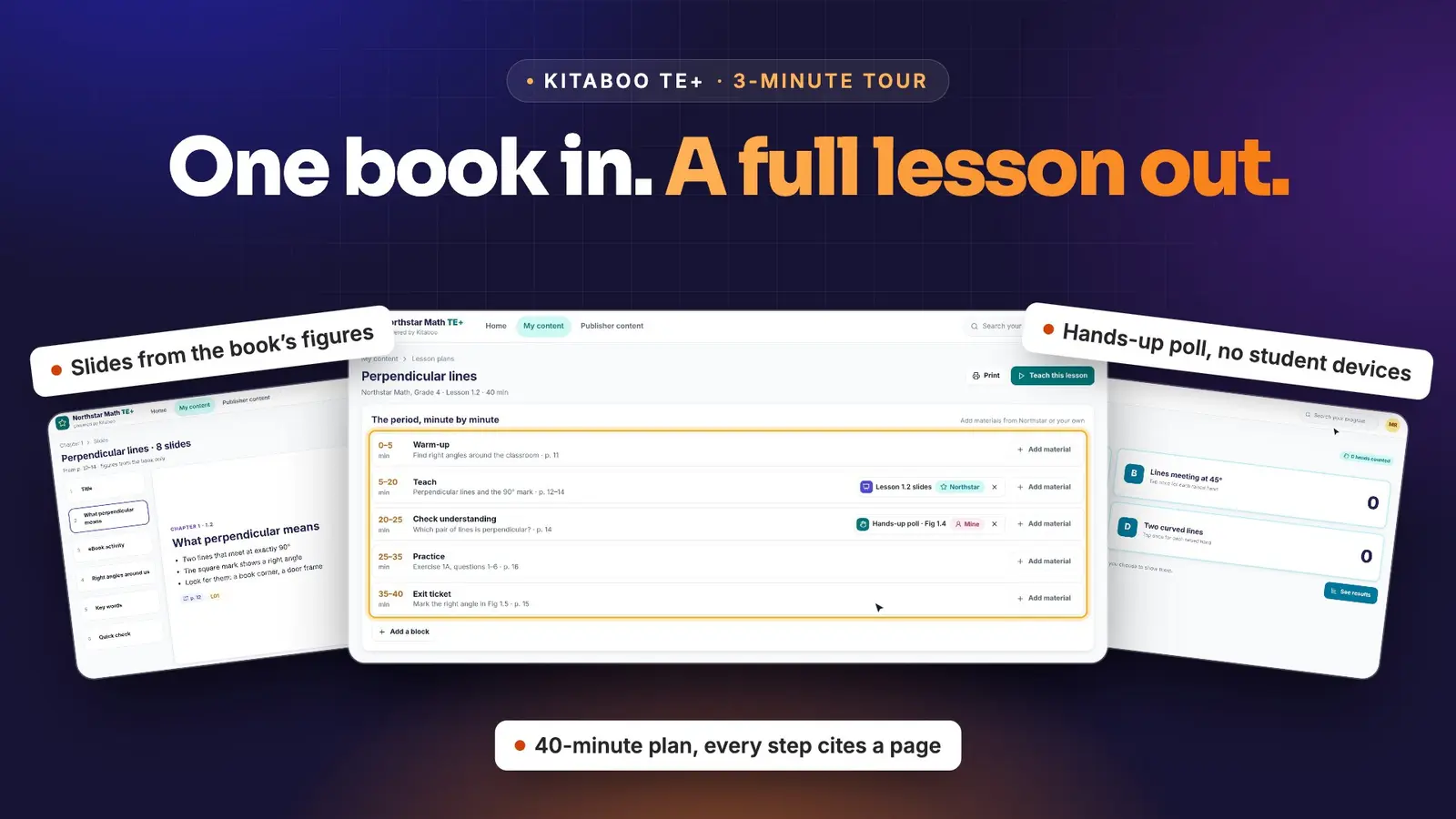
Screens show a sample program from a made-up publisher.
TE+ works from your selected content, shows its sources and keeps teachers in control. When a request goes beyond that content, it explains the limit. Try both requests below.
Choose a request · Northstar Math, Grade 4, Chapter 1
Area is in Chapter 6, not Chapter 1. TE+ only uses the pages the teacher picked.
Anything a teacher writes is marked “Added by you”.
TE+ uses your Student and Teacher’s Editions. It doesn’t use the web.
Teachers can check where any answer came from.
Teachers review, edit and approve each draft before classroom use.
Slides use the pictures from your book.
TE+ doesn’t collect student names or answers. Polls save class totals only.
Pick the tools for each book. For example, only quizzes.
Check lesson plans, slides and questions before teachers see them.
Teachers can report a mistake. Your team sees it in Studio.
Teachers see your name first.
| Title | TE+ on | Tools | Before go-live |
|---|---|---|---|
| Northstar Math, Grade 3 | All tools | Review samples | |
| Northstar Math, Grade 4 | All tools | Review samples | |
| Northstar Math, Grade 5 | Assessments only | Review samples | |
| Northstar Science, Grade 4 | — | Review samples |
It works with Schoology, Canvas and others. Their school’s books appear on their own.
Four big buttons. Lesson plan, slides, worksheet and quiz.
Teachers can use your slides and worksheets, or add them to a lesson plan.
Create with TE+
From Northstar Learning · Chapter 1
See all publisher content ›My content
AI assists. Teachers decide. Adjust lesson timing, edit an activity or add your own material. TE+ supports preparation while teachers shape the lesson for their classroom.
Try the sample lesson
Opens from the LMS with LTI 1.3. Sign in with Clever or ClassLink.
Accessible on every screen, with an outside report to prove it.
We sign the national (SDPC) and state agreements.
Your standards show on lesson plans and questions.
See how TE+ is used. Export to PDF, Word and PowerPoint.
Adoption committees can try TE+ for free.
Try TE+ on one book for one semester. Then decide.
Choose one going into your next adoption.
A PDF works. We do a test run.
Check the lesson plans, slides and questions.
Up to 50 teachers.
Case studies from publishers who already deliver their programs with KITABOO.
| Feature | Printed teacher’s edition | General AI tools for teachers | KITABOO TE+ |
|---|---|---|---|
| Source | Your book | The open web | Only your Student and Teacher’s Editions |
| Page references | Yes | Usually none | A page number on everything |
| Slides, worksheets, quizzes | Made by hand | Generated | Generated from your book, with its own figures |
| Your brand | Yes | No | Yes, on every screen |
| Your content trains AI | No | Depends on the tool | Never |
| Student data | None | Depends on the tool | None collected |
| Teacher control | Full | Varies | Teachers review and approve every draft |
Answers
Ready to see it?
Give teachers more ways to use your curriculum. Start with a 30-minute walkthrough, then explore a sample based on your Teacher’s Edition.
DRM-protected, white-label eReader with content management and distribution controls.
AI-powered conversion of PDFs and InDesign files into accessible, interactive eBooks.
Branded training platform with courses, assessments, certifications and analytics.
AI-powered accessibility audits, alt-text generation and content remediation.